
爱意满满的作品展示区。
buhuipao

做了个 MyShare:把 AI 生成的 HTML 或本地网页变成临时密码链接,发给朋友试用

  •  
  •   buhuipao · 12 days ago · 760 views

    大家好,我是 MyShare 的作者,想介绍一个给网页作品做临时演示的小工具:

    https://sharemydemo.com/

    如果你用 AI 做出一个 HTML 页面,想让朋友点点按钮、试试交互,可以直接选中文件,生成带临时密码的链接发过去。对方用浏览器打开,不需要注册 MyShare 或安装插件。

    它也能分享正在运行的 localhost 网页、明确选择的局域网 HTTP 服务,或者单独的后端 HTTP API 。比较适合还在修改的原型、客户评审和课堂互动页面。

    可以先用我们准备的单文件样例走一遍:

    1. 下载 https://sharemydemo.com/examples/html-demo/ 里的 HTML 。
    2. 在首页选择「 HTML 文件」,选中它,完成验证和首次分享协议确认。
    3. 生成链接,在另一个标签页打开,点击计数按钮检查交互。
    4. 发给朋友试用,演示结束后停止分享。

    免费无需注册,每次最多 60 分钟、150 MB ,同时一份分享。分享电脑和浏览器要保持运行、联网;分享本地服务时,该服务也要运行。普通网页模式需要保留分享标签页;可选扩展连接成功后可以关闭该页,但浏览器仍要运行。它不是关机后还能访问的永久托管。

    网页作品还可以收集访客公开评论;统计和页面回放分别需要访客同意。Free / Pro 保存每位访客最近上传的最多 30 秒回放,不承诺录下完整访问。

    两个容易踩到的限制也提前说一下:单 HTML 最好自包含;有 CSS 、JS 、图片时要选择完整文件夹,根目录需要 index.html 或 index.htm 。文件修改后需要重新选择。localhost 的 CORS 、Cookie 登录和热更新也有模式区别,说明在这里: https://sharemydemo.com/compatibility/

    想听听大家实际用来分享什么,以及从选文件到朋友打开这一步,有哪里不顺手。免费流程不需要先购买套餐。
    Supplement 1  ·  9 days ago

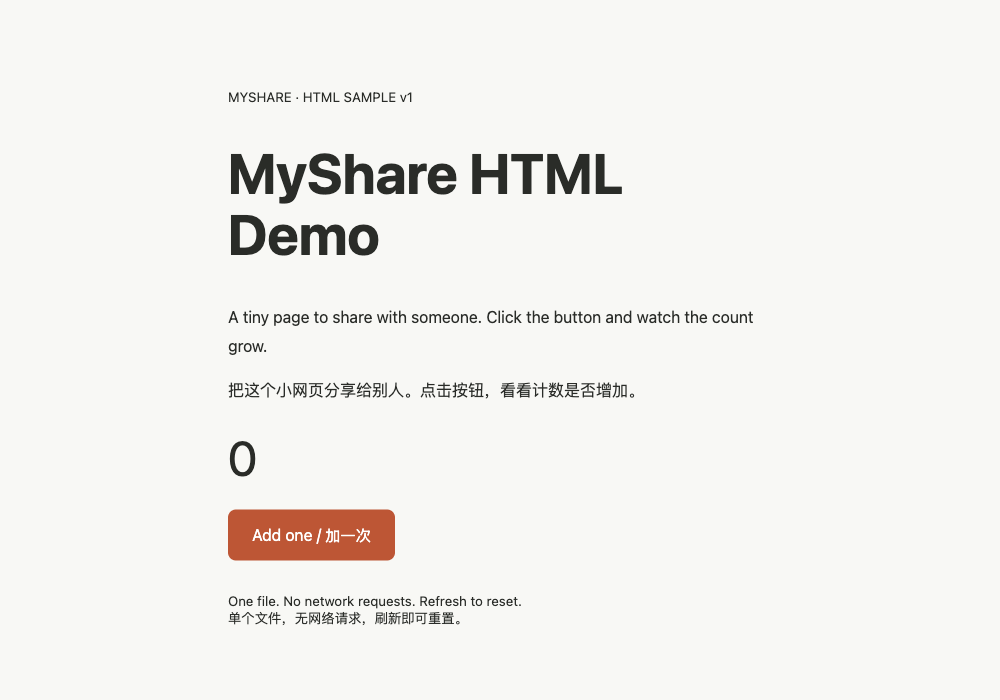
    Here is the self-contained HTML sample mentioned above. It is a small interactive counter, so you can check that the shared page works beyond a static preview.

    MyShare's sample HTML page with an Add one counter button

    Try the sample: https://sharemydemo.com/examples/html-demo/

    Quick check: select its HTML file, create a share, open the visitor link in another browser, and click "Add one". Keep your computer and browser online and, in webpage mode, leave the sharing tab open. Free shares last up to 60 minutes with 150 MB.

    If a step fails, please tell me which step and browser you used. I am the author and can help check it.

    No Comments Yet
    About   ·   Help   ·   Advertise   ·   Blog   ·   API   ·   FAQ   ·   Privacy   ·   Solana   ·   1243 Online   Highest 6679   ·     Select Language
    创意工作者们的社区
    World is powered by solitude
    VERSION: 3.9.8.5 · 28ms · UTC 17:07 · PVG 01:07 · LAX 10:07 · JFK 13:07
    ♥ Do have faith in what you're doing.