notgoda
V2EX  ›  问与答

求 V 友支招, U 盘写保护尝试用 diskpart 命令无法清除,谢谢

  •  
  •   notgoda · Dec 28, 2021 · 1310 views
    This topic created in 1623 days ago, the information mentioned may be changed or developed.
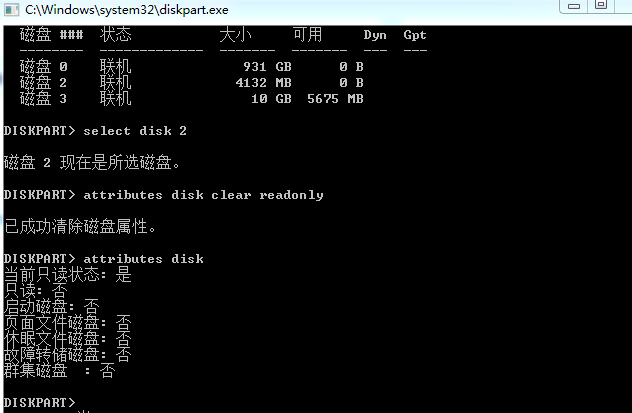
    大佬们 , U 盘如何强制去除写保护并格式化, 16G U 盘被分成两个磁盘(1, 2), 其中磁盘 1 被写保护, 我用 WIN CMD 中 diskpart 命令 : attributes disk clear readonly 命令 清除 U 盘的写保护状态,已经显示执行成功, 但是 attributes disk 还是显示只读状态,
    ![image.png]( https://s2.loli.net/2021/12/28/AfWLmpzK17I9yho.png)
    5 replies    2022-01-17 16:58:21 +08:00
    notgoda
        1
    notgoda  
    OP
       Dec 28, 2021
    执行 clean
    报错
    ![image.png]( https://s2.loli.net/2021/12/28/5Wku8XsqM47jetE.png)
    zerohzd
        2
    zerohzd  
       Dec 28, 2021
    找量产工具试试
    notgoda
        3
    notgoda  
    OP
       Dec 28, 2021
    @zerohzd 估计当初就是用量产工具被分成两个磁盘(1, 2), 其中磁盘 1 被写保护, 现在只能用出厂的量产工具刷吗? 大佬能推荐一个量产工具吗?
    lxc404
        4
    lxc404  
       Dec 28, 2021
    @notgoda 量产工具不是通用的,先用芯片无忧看主控型号,再根据型号去 U 盘量产网找工具试吧

    https://www.mydigit.cn/forum.php?mod=viewthread&tid=16812
    notgoda
        5
    notgoda  
    OP
       Jan 17, 2022 via iPhone
    @olaloong 谢谢 V 友。这个新注册用户没有下载权限。大佬能够分享一个吗?再次感谢。
    About   ·   Help   ·   Advertise   ·   Blog   ·   API   ·   FAQ   ·   Solana   ·   1158 Online   Highest 6679   ·     Select Language
    创意工作者们的社区
    World is powered by solitude
    VERSION: 3.9.8.5 · 29ms · UTC 23:19 · PVG 07:19 · LAX 16:19 · JFK 19:19
    ♥ Do have faith in what you're doing.
